What Is a WiFi Captive Portal?
A complete guide to captive portals — what they are, how they work, and why they're the highest-yield email capture method for physical businesses.
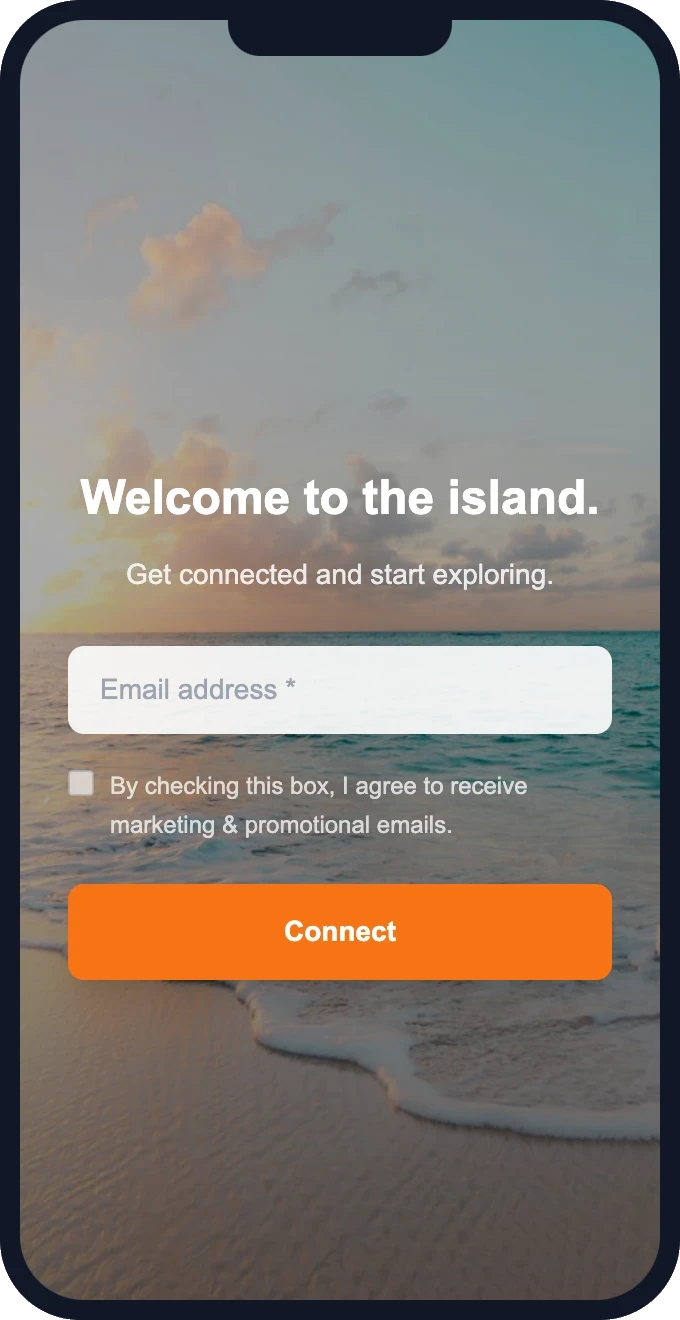
If you've ever connected to WiFi at a hotel, airport, or coffee shop and been shown a login page before getting online, you've used a captive portal. That login page — where you might enter an email, accept terms, or click "Connect" — is the captive portal.
For businesses, captive portals aren't just a technical necessity. They're a marketing channel. Every customer who connects to your WiFi and enters their email is a contact you own — one you can send promotions to, build loyalty with, and bring back again and again.
How a WiFi captive portal works
The flow is simple from both the customer's and the business's perspective:
- Customer connects to your guest WiFi network. Their device detects the network is open and attempts to get online.
- The captive portal intercepts the connection. Instead of reaching the internet, the customer sees your branded splash page — with your logo, colors, and a form asking for their email.
- Customer enters their email and taps "Connect." They're now online. Their email is captured and stored in your customer database.
- You send follow-up marketing. Welcome emails, promotions, loyalty offers, event invites — all automated or manual, straight to a verified email address.
The reason this works so well is that WiFi is something customers actively want. Unlike a QR code on a table (which most people ignore) or asking at the counter (which feels intrusive), the captive portal gives customers something they're already looking for — internet access — in exchange for a low-friction action: typing their email.
Why businesses use captive portals
1. Capture 70-90% of customer emails
Most businesses that implement a WiFi captive portal capture between 70% and 90% of customers who connect. Compare that to paper sign-up sheets (5-15%), QR codes on tables (2-8%), or verbal asks at the counter (varies wildly based on staff effort). WiFi is the highest-yield email collection method for any physical location.
2. Build a customer database you own
Social media followers can disappear if an algorithm changes. Review platforms control who sees your listing. But an email list is yours. You can export it, segment it, and use it regardless of what any platform decides to do.
3. Drive repeat visits with promotions
Once you have a customer's email, you can send targeted promotions: happy hour announcements, new menu items, seasonal specials, loyalty rewards, birthday offers, or event invitations. Businesses that email their WiFi-captured list regularly see measurable increases in repeat visits.
4. No additional effort from staff
The captive portal runs automatically. Staff don't need to ask customers for anything, hand out forms, or explain the process. The customer interacts with the splash page directly on their own device. Zero training, zero awkwardness.
What types of businesses use captive portals?
Any business that offers free WiFi can use a captive portal. The most common are:
- Cafés and coffee shops — promote seasonal drinks, loyalty rewards, and new menu items.
- Restaurants and bars — fill slow nights with happy hour promos and event invites.
- Hotels and B&Bs — capture guest emails at check-in, drive direct re-bookings.
- Gyms and fitness studios — promote classes, memberships, and referral bonuses.
- Retail stores — send sale alerts, new arrivals, and exclusive offers.
- Coworking spaces — build member databases, promote events and room availability.
- Vacation rentals — collect guest emails during the stay, bring them back direct (commission-free).
Ready to see this in action?
Set up takes 15 minutes. Free — we configure everything for you.
What does a captive portal look like?
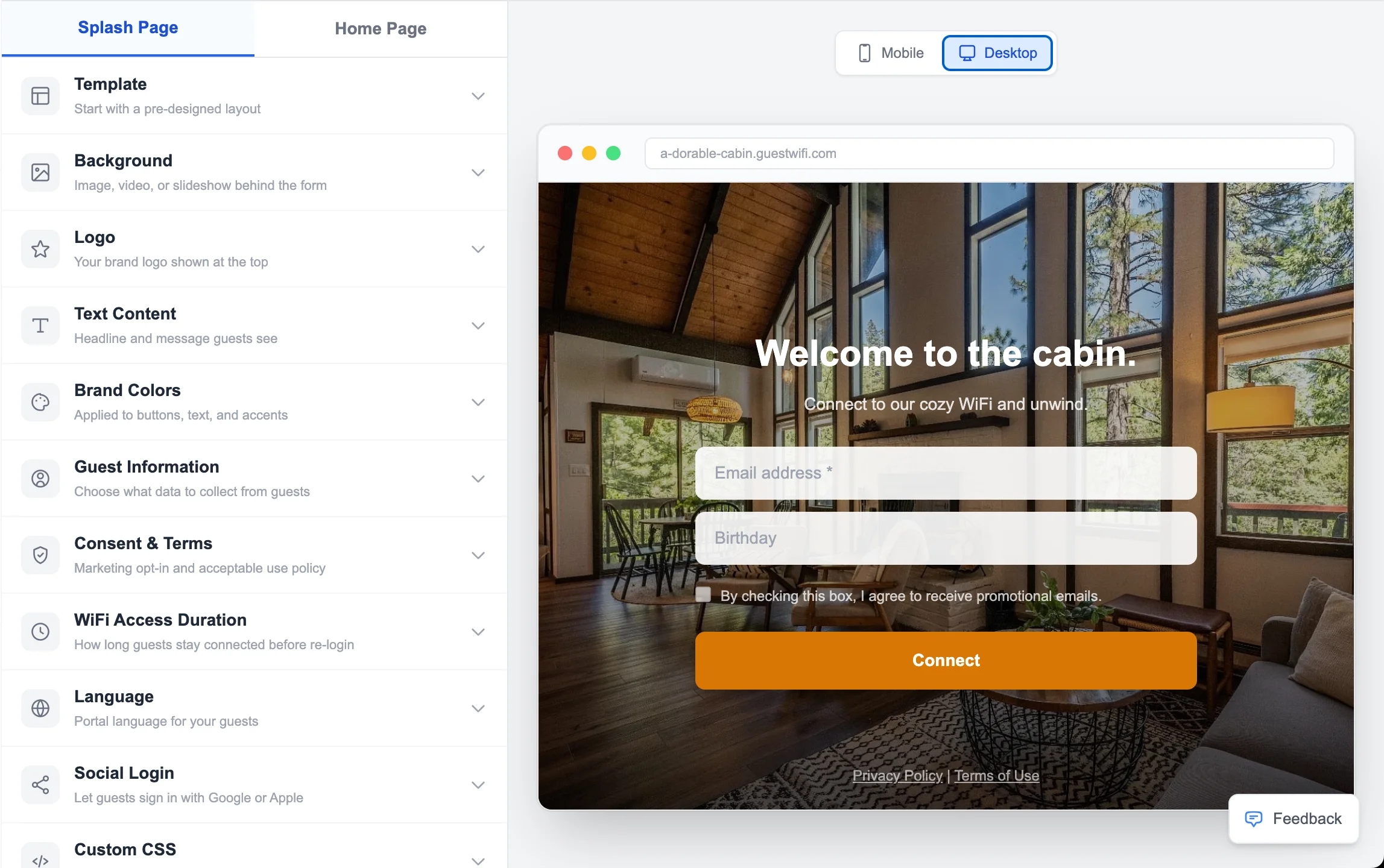
A modern captive portal is a branded splash page — not a generic "click to connect" screen. It shows your logo, your brand colors, a welcoming headline, and a simple form. Customers see it on their phone or laptop the moment they join your WiFi. After submitting the form, they land on your post-connection homepage — which can show your menu, booking link, social profiles, or whatever you want them to see next.
Is a WiFi captive portal legal?
Yes — as long as you collect data with consent. A properly configured captive portal includes a consent checkbox(e.g., "I agree to receive marketing emails") and logs the consent text, timestamp, and IP address. This keeps you aligned with GDPR (for EU visitors) and CAN-SPAM (for US marketing). A one-click unsubscribe link in every email you send completes the compliance picture.
What hardware do you need?
You need a standard WiFi access point — an off-the-shelf device (typically $50-$150) that works alongside your existing router and internet connection. Unlike some providers that require proprietary, locked-down hardware, modern captive portal solutions work with common access points from brands like UniFi, TP-Link, and Netgear.
Most businesses need just one access point per location. Larger spaces (multi-floor hotels, big gyms) may need 2-3 for full coverage — but the architecture is the same.
Captive portal vs. password WiFi
Some businesses just post a WiFi password on a sign. This gets customers online but gives you nothing in return. No email, no data, no way to reach them after they leave. A captive portal replaces the password with a form — same end result for the customer (they get online), but you get a marketing contact in exchange.
Getting started
Setting up a captive portal takes about 15 minutes with a modern platform. You'll choose a template for your splash page, add your branding (logo, colors, headline), decide what fields to collect (email is standard; name and phone are optional), and connect your access point. Many providers — including GuestWiFi — handle the setup for you at no charge.
Once live, the system runs automatically. Every customer who connects builds your list. Every email you send brings them closer to coming back.
Start capturing customer emails today
$15/month per access point. All features included. We set it up for you — free.
Get Started — Free Setup →No credit card required · Cancel anytime